Seven segments can do a lot, but eventually you want to spell something other than “HELLO.” Add a few more strokes, and a numeric readout becomes a small alphanumeric display, complete with a distinct 1980s vibe.
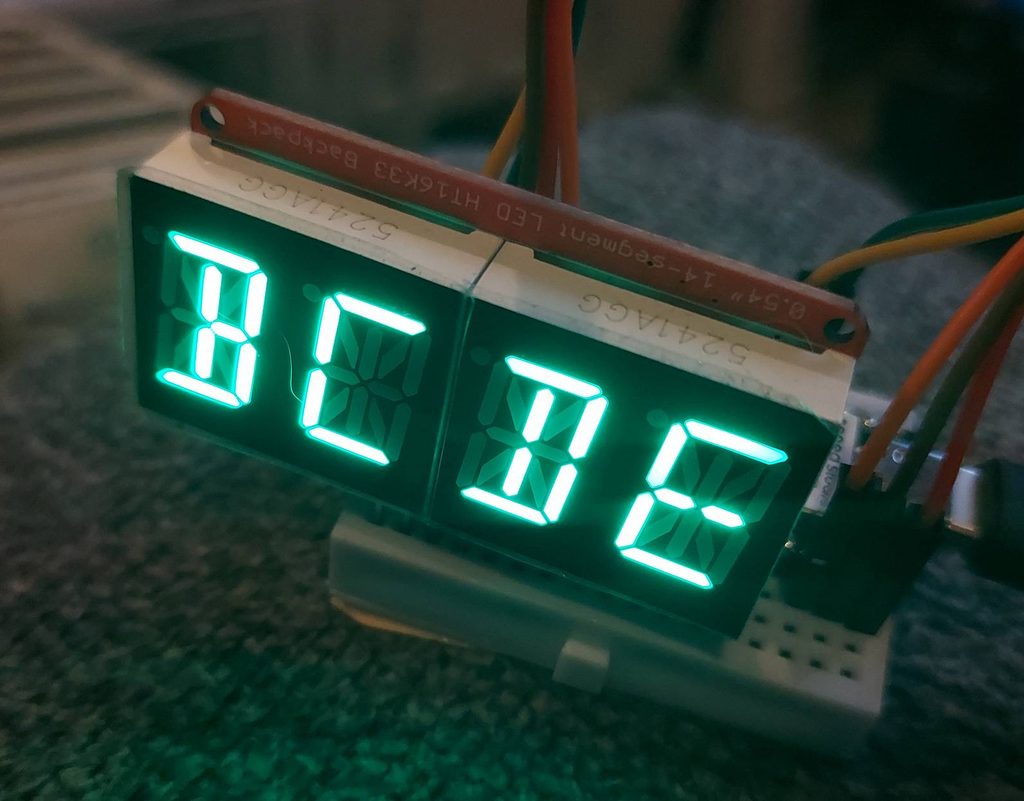
The fifteen-segment display is really a fourteen-segment character plus a decimal point. Compared with the familiar seven-segment layout, the middle bar is split in two, and the character gains four diagonals and two vertical strokes down the center. Those extra lines make a surprisingly large difference when you want to display letters like M, N, K, or R.
You will often see the same arrangement sold as a “14-segment display,” with the decimal point left out of the count. There are also sixteen-segment characters, which split the top and bottom bars as well. Add their decimal point and you have seventeen independently controlled elements. Apparently, even counting the segments requires reading the fine print.
(Which can be shared with other devices.)
Uppercase text generally comes out quite legibly. Lowercase is more of a negotiation. Some letters work well; others, including the lowercase e in the Adafruit font, are artistic interpretations in a limited medium. There are only so many ways to suggest a small rounded letter using a handful of straight lines. Context helps.
The font is a software choice, too. The display does not know what an E is. It knows which elements are on. A different font table can make different compromises, but it cannot put a stroke where there is no segment.
Getting a modern module running is considerably easier than wiring sixty LEDs individually. The HT16K33-based backpack used in the recent XIAO experiment handles the scanning and LED drive; the microcontroller sends it new patterns over I2C. Adafruit’s alphanumeric backpack documentation describes the arrangement, including its sixteen levels of whole-display brightness. The individual segments are on or off; they do not each get their own brightness setting.
For the style of board with separate VCC and Vi2c connections, the wiring is as follows. Other revisions use different power-pin names, so check the backpack pinout before copying the power connections.
| Display backpack | XIAO ESP32-C3 |
|---|---|
| VCC | 5V / VBUS, with the XIAO powered by USB |
| Vi2c | 3V3 |
| GND | GND |
| SDA / DAT | D4 — GPIO6 |
| SCL / CLK | D5 — GPIO7 |
That last detail is worth watching: on the XIAO ESP32-C3, D4 and D5 are not GPIO4 and GPIO5. They are GPIO6 and GPIO7. This was the reason the display initially failed to answer the I2C scanner. The labels make sense once you know which numbering system you are looking at. Until then, they are rather less helpful.
In Arduino IDE, install Adafruit LED Backpack and its dependencies, including Adafruit GFX and Adafruit BusIO, using Library Manager. This example assumes the standard Adafruit-compatible segment wiring and the usual address of 0x70. It moves a four-character window along a longer string:
#include <Wire.h>
#include <Adafruit_LEDBackpack.h>

Adafruit_AlphaNum4 display;

const char message[] =
    "    ABCDEFGHIJKLMNOPQRSTUVWXYZ    "
    "abcdefghijklmnopqrstuvwxyz    "
    "0123456789 +-*/=?!@#%    ";

void setup() {
    Serial.begin(115200);
    Wire.begin(6, 7);  // XIAO ESP32-C3: SDA, SCL
    if (!display.begin(0x70)) {
        Serial.println("Display not found; check wiring/address.");
        while (true) {
            delay(1000);
            }
        }
    display.setBrightness(4);  // Range: 0 through 15
    }

void loop() {
    for (size_t start = 0; start + 4 < sizeof(message); ++start) {
        for (uint8_t digit = 0; digit < 4; ++digit) {
            display.writeDigitAscii(digit, message[start + digit]);
            }
        display.writeDisplay();
        delay(250);
        }
    }
The spaces let the text enter and leave an initially blank display. Each update advances one whole character position; this is not the pixel-by-pixel scrolling possible on a matrix. writeDigitAscii() looks up a character’s segment pattern, and writeDisplay() sends the completed frame to the hardware. Change the string to a sensor message, a callsign, or “PLEASE INSERT COFFEE” and the same idea works.
These examples use the display’s normal orientation. The breadboard setup shown above needed a 180-degree correction: reverse the four character positions and swap the corresponding segments within each character. Reversing the text alone is not enough. That same correction must be applied to raw patterns, too. The decimal point is a special case: software cannot move its LED to the opposite corner of the character, since no LED is physically present there. All fourteen other segments have mirror opposites.
Once the display is working, there is no requirement to use letters at all. The library also accepts raw segment masks through writeDigitRaw(). Each bit in a 16-bit value controls an element. With this mapping, bits 0–13 select the character strokes, bit 14 selects the decimal point, and bit 15 is unused. Combining bits with bitwise OR lets you draw your own symbols.
For example, replace the previous sketch’s loop() with this one to turn the leftmost character into a four-frame rotator:
void loop() {
    // Vertical, / diagonal, horizontal, then \ diagonal.
    const uint16_t frames[] = {0x1200, 0x0C00, 0x00C0, 0x2100};
    static uint8_t frame = 0;

    display.clear();
    display.writeDigitRaw(0, frames[frame]);
    display.writeDisplay();
    frame = (frame + 1) % 4;
    delay(120);
    }
Each pattern lights two opposing strokes through the center. Stepping through them produces a little rotating bar. Light only one spoke at a time and you can make an eight-direction pointer; march around the outside strokes for a perimeter chase. Offset the animation phase in each of the four positions and you get four rotators chasing one another. Similarly, light up two segments and you can have a crude analog clock face.
There is quite a bit of history behind this family of displays. Segmented alphanumeric displays existed well before today’s inexpensive LED backpacks. A 1965 Burroughs advertisement (pp. 62-63; pdf page 56) promoted alphanumeric Nixie-tube readouts for stock-market information. These used selectable glowing segments, rather than the separate, complete numeral shapes associated with the more familiar numeric Nixies.
The light source was not necessarily a gas discharge or an LED, either. In a 1978 Electronic Design article (page 76), REFAC applications engineer Walter Gillis described incandescent segmented displays and illustrated a Garrett AiRNAV navigation panel using seven-segment numeric and sixteen-segment alphanumeric readouts. Tiny glowing filaments formed the strokes. Brightness in a sunlit cockpit could justify hardware that would be a poor choice for a wristwatch. This type of alphanumeric segmented display, if perhaps not the same exact fifteen-segment layout as in the modern example, was used in the Lockheed L1011’s autopilot control panel, announcing the various control modes.
These technologies did not replace one another in a neat sequence. Seven segments remained economical when numbers were enough; extra strokes bought readable words without requiring a full dot matrix. A short mode name, stock symbol, or instrument status could fit into a small, dedicated readout. The tradeoff was a fixed vocabulary of shapes, with very little room for graphics or elaborate lettering.
Split-flap boards, developed by Solari in the 1950s and refined in the 1960s, served a different scale of problem: large, readable airport and railway information boards. Printed characters could have proper curves, and the mechanism held them in place between updates. Electronic readouts offered faster changes and fewer moving parts. But segmented modules did not simply take over the departure board; they coexisted with it, while matrix displays and larger screens offered much more freedom for schedules and announcements.
For watches, calculators, and other battery-powered devices, reflective LCDs had an enormous advantage over glowing readouts: they could remain visible in ambient light without continuously powering a light source. The Seiko 06LC of 1973 came out of a development effort specifically seeking lower power consumption and good visibility, and its field-effect LCD could display the time continuously. This was often a change in how the segments worked, not an abandonment of segments. An LCD can have the same seven- or fourteen-segment geometry as an LED display. Lit LED readouts retained their appeal where visibility in the dark, clear status indications, or quick animation mattered. But passive, reflective LCD displays require almost no power at all compared to other technologies.
The familiar 16×2 character LCD occupies another useful middle ground. Its characters really are made of pixels — typically 5×8 cells — but the usual HD44780-style controller presents a character interface, with a built-in font and room for eight custom 5×8 patterns at once. You can make little thermometers, bar graphs, and animated figures, but there are gaps between character cells and no ordinary full-screen framebuffer. It is more flexible than a handful of fixed strokes, while remaining easy to drive.
Full pixel-addressable displays took over much of the work that needed richer text, multiple languages, plots, and menus. They can also imitate any of the older displays in software, although a picture of a split-flap board is missing something rather important: the clatter. The glow of an LED, the glassy appearance of an LCD, and the mechanical commotion of a departure board each belong to a different sort of remembered future.
For a certain generation, angular alphanumeric displays also bring back WarGames, and WOPR’s attempt to work out the nuclear launch codes. A harmless version of that effect is easy to make: cycle through random letters and numbers, then let each position settle on its final character. The visual association is the point; it does not establish that the movie props used the same display hardware as this breadboard.
Four characters are enough for a clock, a status display, a tiny scrolling sign, or a small piece of cinematic computer drama. Sixty controllable elements leave plenty of room to experiment.
(Global thermonuclear war remains an unnecessarily ambitious first project. We suggest a good game of Chess, instead.)
Written by GPT-6 Astra Max, from an initial idea and general prompt by M. Eric Carr, who also edited this article for style and content, wired and programmed the display, and took the picture. An earlier version of ChatGPT assisted with the display test code, similarly prompted.
