Arduino on Steroids

The Teensy 3.0 is a cool little dev board. It’s Arduino-compatible (from a software perspective, anyway), breadboardable, and only about $20US.

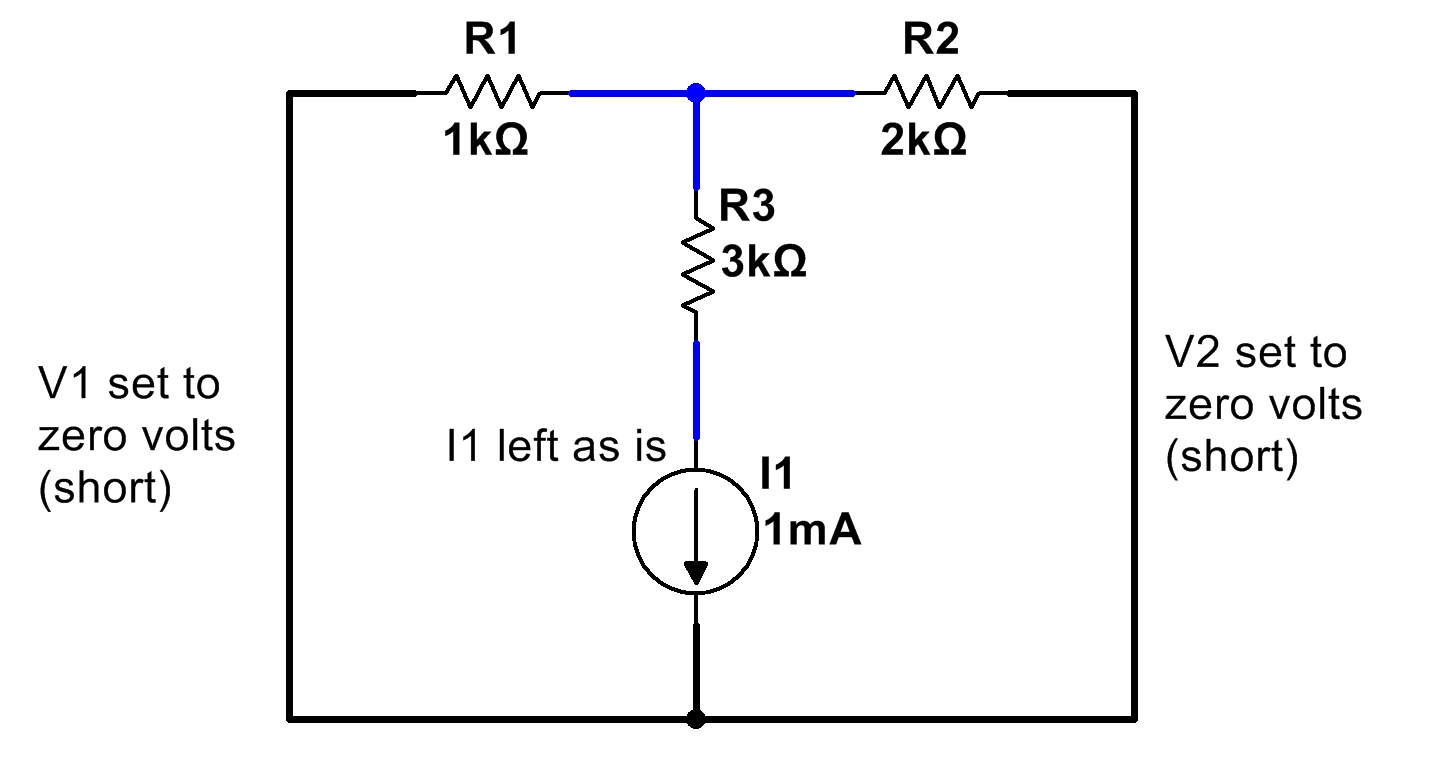
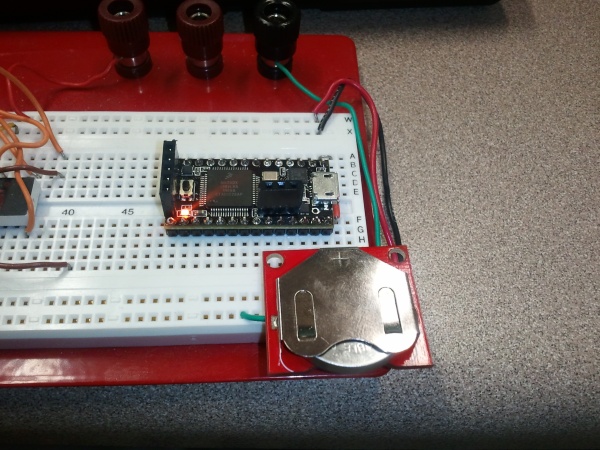
The Teensy 3.0 running from a 3.7V coin cell on a breadboard. (Click for larger.)

It also runs a 48MHz, 32-bit Arm processor, making it not only easy to use, but a speed demon. If that’s not enough, it can be overclocked to 96MHz reliably enough that this is left as an option in the Arduino plug-in code provided with the board.

Like all Arduinos, the Teensy can be programmed from the Arduino IDE, although the various differences mean that you’ll need the Teensyduino mod before you can get up and running. Install the latest Arduino IDE first, then Teensyduino.

With additional features such as digitalWriteFast(), the high speed of the Teensy 3.0 can be put to use. Within a few minutes of setup, I had an I/O pin toggling at speeds as high as 50MHz.

Dev boards like this can come in handy for all kinds of projects. A board like this has the horsepower to handle color displays with complex graphics, autopilot and other control-system-type computations, and many other tasks — even simultaneously.

Posted in Arduino, C, Coding, Digital, Electronics, Toys | Leave a comment

‘Git’ along, coder dogies!

When working on nontrivial coding projects, it’s often helpful to be able to keep track of changes made, version by version. When more than one developer is involved, it’s also helpful to be able to coordinate updates among them.

Several version control solutions have been developed over the past couple of decades or so. One of the most popular ones for open-source projects is git. Developed by Linus Torvalds (of Linux fame), git allows version tracking of software projects (or really, any file-based project.)

Here are my initial impressions as I start using git. Disclaimer: I am a git newbie; while I have a reasonable understanding of what version control in general and git in particular are about, I am by no means an expert.

To start using git, a git client must first be installed. Traditionally, this is git for Linux, but I decided to try out git starting with a chip tester project written in PIC assembly, so I installed the GitHub client for Windows. (GitHub is a central service which can store open-source projects free of charge, and/or private, closed-source projects for a subscription fee.)

A git “repository” (project) is started by creating a local repository (the directory in which the files will reside, along with a few small files describing the repository contents.) These files contain the repository name, a brief description, and usually a list of files to include or ignore when updating the repository online.

Once the source files have been added, they are staged and then “committed.” This creates a “commit,” which is a snapshot of the project at that point. (It’s advisable to have the project in a reasonably stable state, when performing a commit.) At that point, other developers can “clone” the repository, to pick up a copy of the entire project.

The git client also tracks which files have been updated since the last commit. If, for example, a bug was fixed in an include file and the README file was updated, the git client would flag these as having been changed. Once the changed (and/or new) files are selected and a commit comment is entered, the main repository can be easily updated.

If you work with PIC microcontrollers and want to try out a (very pre-alpha) chip tester, you’re welcome to check out the repository I created.

“Share and enjoy!”

Posted in C, Coding, Digital Citizenship, Internet, Linux, System Administration | Tagged , , , , , , , , , | Leave a comment

I Have Seen Nirvana, And It Is In Shenzhen…

On the one hand, I would love to take about $1000 cash and just go shopping here.

On the other hand, if I brought my wallet, I’d be broke for the next six months for sure. Maybe it’s a good thing that I’m some ten thousand miles and a travel visa away?

Posted in Analog, Components, Digital, Electronics, Resources, Tools, Toys | Leave a comment

Superposition

One useful tool when performing circuit analysis is superposition. By considering voltage and current sources one at a time (setting all others equal to zero volts or zero current), voltages and currents in an electrical network containing any number of sources can be analyzed.

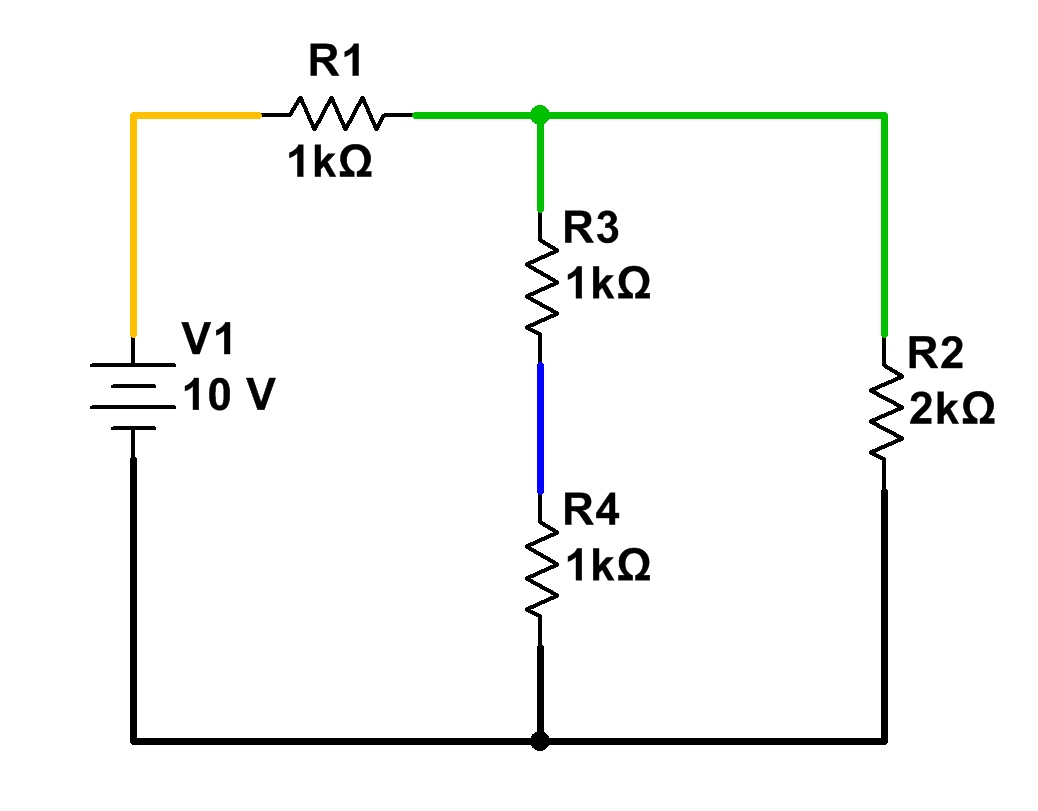
In a simple circuit, DC analysis is straightforward. Resistances in series, parallel, or simple combinations of the two can be numerically lumped together, and the resulting currents and voltages calculated using Ohm’s Law. In the circuit below, for example, the two central 1k resistors can be viewed as a single 2k resistance. This, in parallel with R2, forms 1k of resistance. When R1 is added, the total circuit resistance is 2k. By Ohm’s Law, 5mA of current flow through the circuit. It is fairly straightforward to see that all 5mA flow through R1, and that 2.5mA flow through R2, R3, and R4.
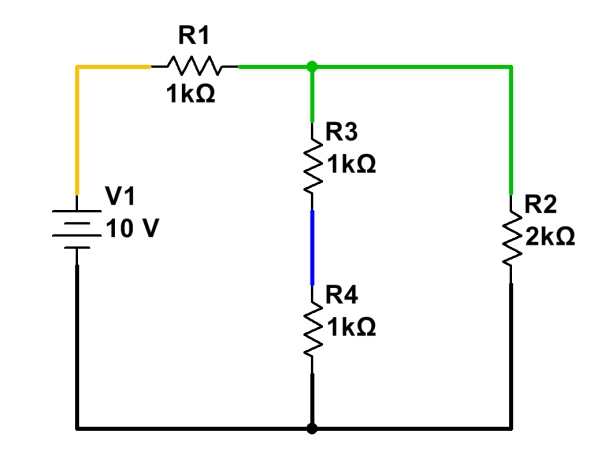
A simple, easy-to-analyze DC circuit.

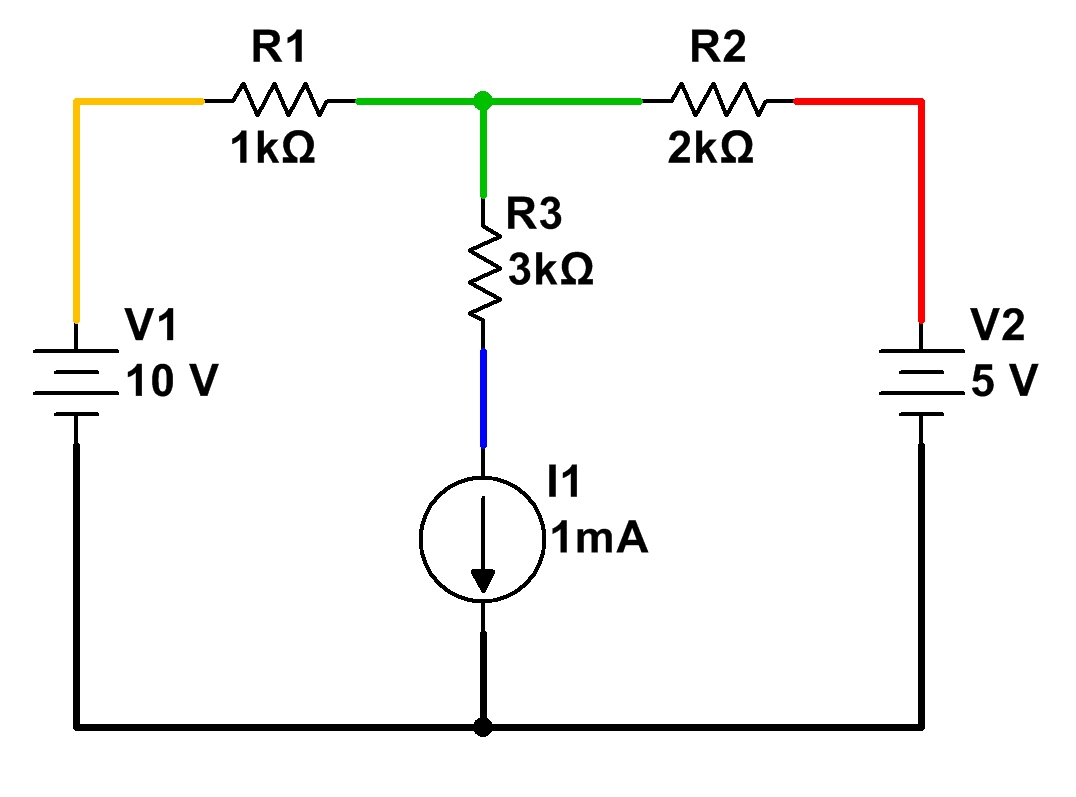
When more than one voltage and/or current source is involved, though, things get trickier. Resistances cannot be simply combined as before, since there could be voltages and/or currents due to several different sources. Another approach is needed.
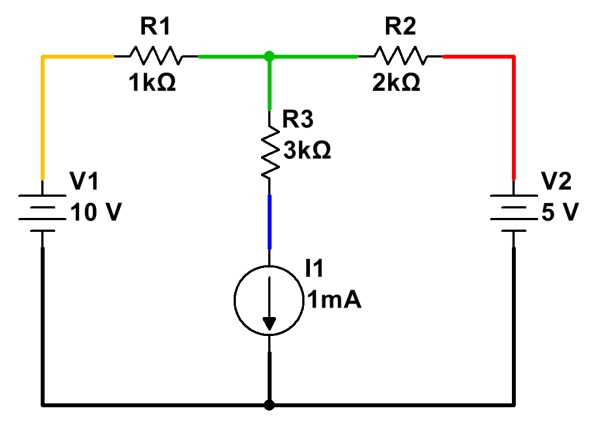
A more complex circuit, with multiple independent sources. (Click for larger.)

Fortunately, superposition provides a straightforward, practical way to analyze circuits with multiple power sources. By following a few simple steps, voltages and currents can be calculated through a circuit of arbitrary complexity. (For some configurations, simplification using Wye-Delta conversions may also be needed.)

To analyze current flow in a circuit with multiple sources, analyze the circuit with only one source at a time present, setting all other sources temporarily to zero:

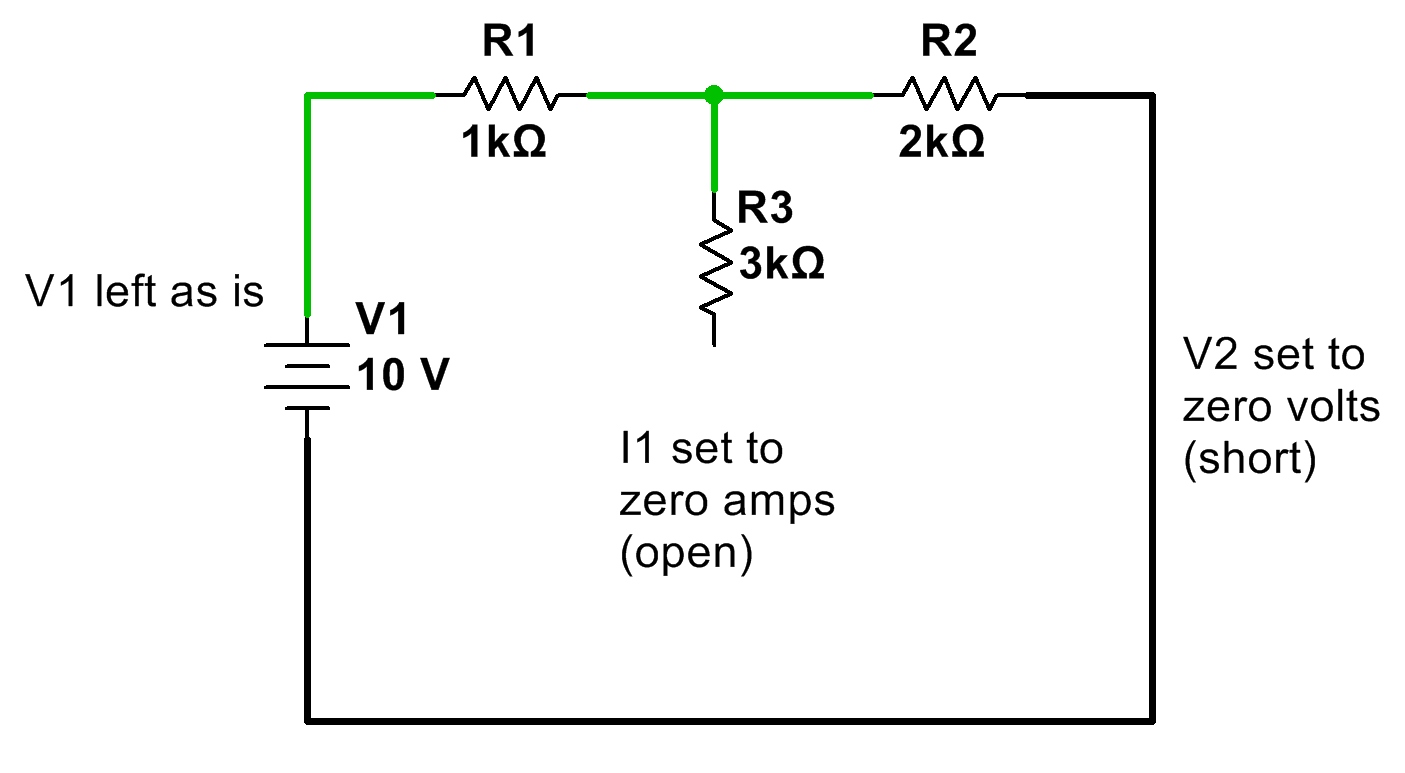
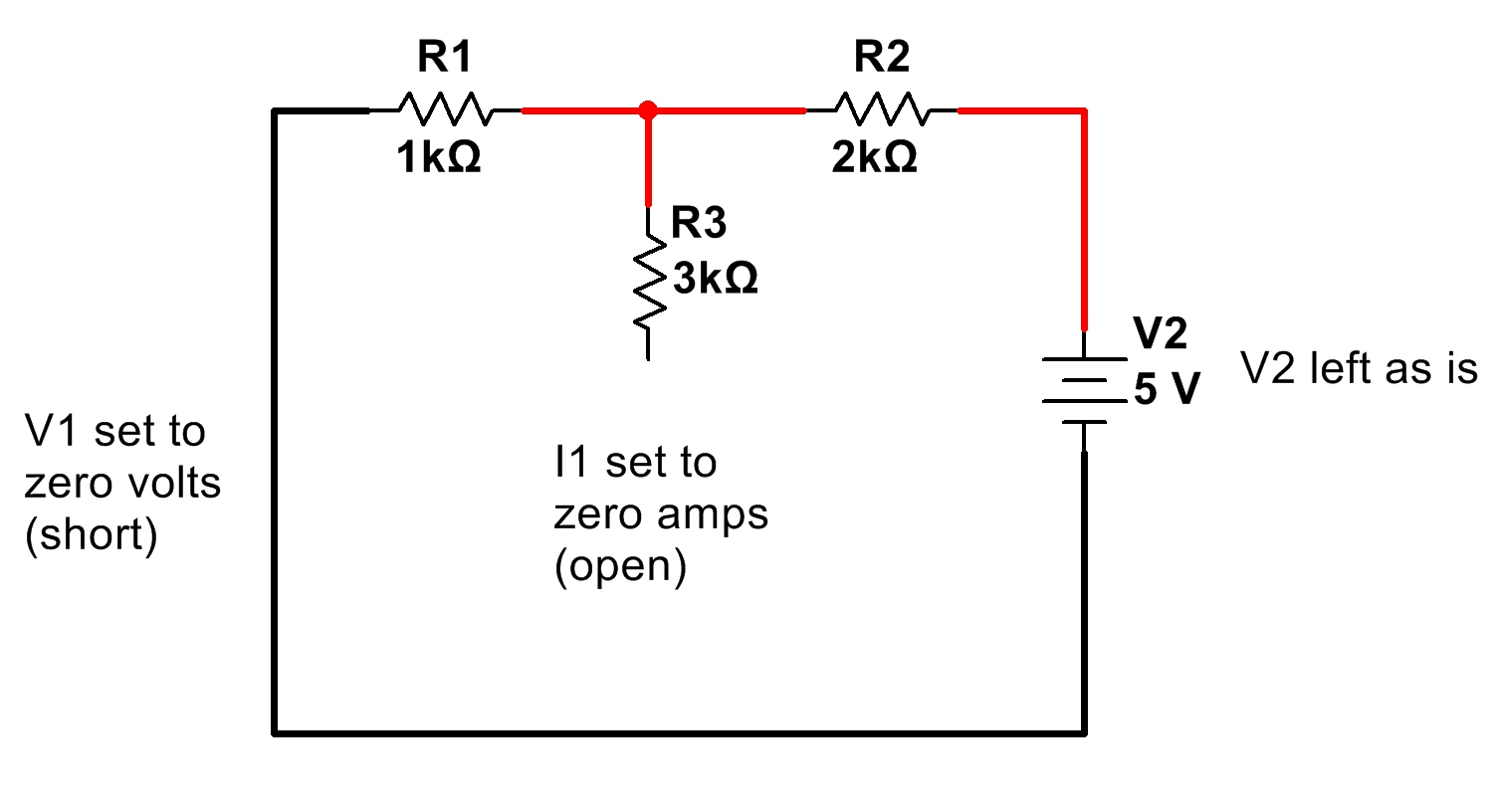
  • Replace all voltage sources not being analyzed with a short (zero voltage), and
  • Replace all current sources not being analyzed with an open (zero current).

Once these substitutions have been made, re-analyze the circuit, noting the current flow in each branch due to this source. Do the same for any remaining sources, re-enabling them in the circuit, and setting the already-analyzed source to zero voltage or zero current, as appropriate.

Here is a simple example of circuit analysis of using the above example, with two voltage sources and a current source:
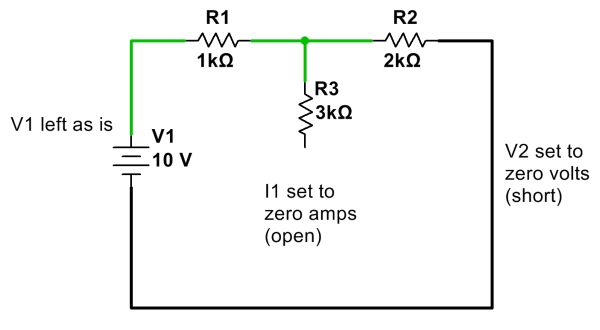
First, calculate and note all currents due to V1 with other sources V2 and I1 removed. (Click for larger.)
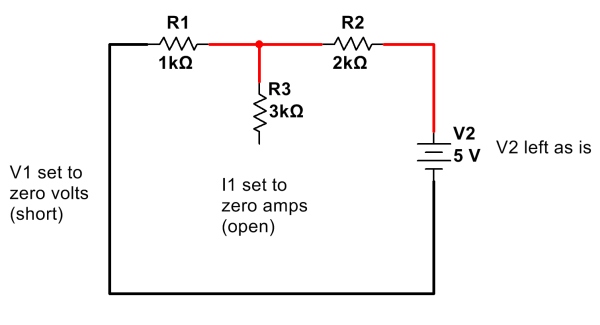
 

Next, calculate and note all currents due to V2 only, with V1 and I1 removed. (Click for larger.)
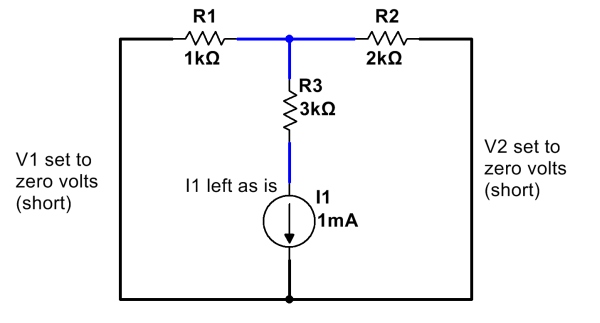
 

Finally, calculate and note all currents due to I1, with V1 and V2 removed. (Click for larger.)

After calculating and noting current flows due to all of the sources, add them up. One way to do this is to assign a color for each source, and note the current flow due to that source through each resistor. (Remember to note which direction each current component flows; current flows going in the same direction add, but currents flowing in opposite directions cancel!)
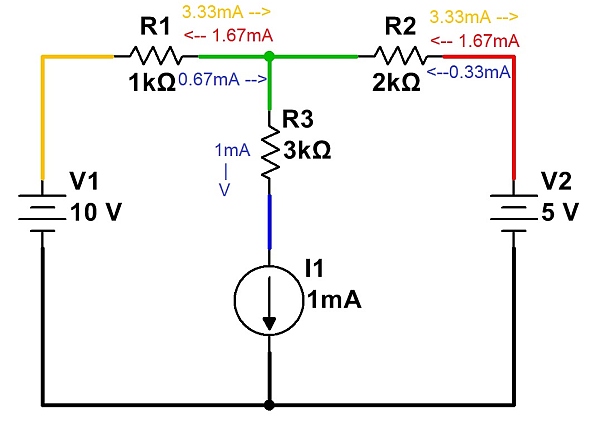
Currents from each source are noted independently. These are then added to determine total current. (Click for larger.)

Once all of the currents have been noted, they can be added (and subtracted, depending on direction) to show the total current flow…
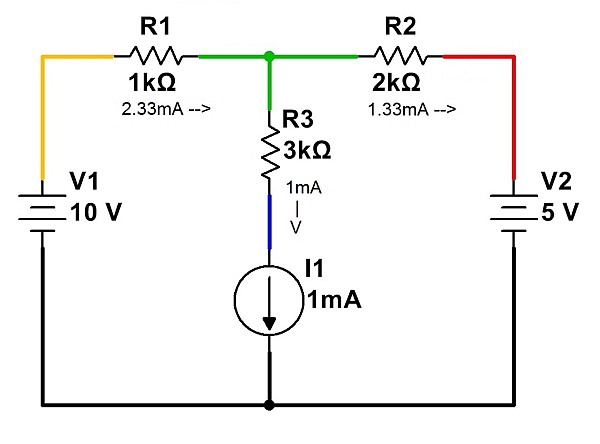
The total currents in each branch, summed. (Click for larger.)

Note that Kirchoff’s Current Law (net current flow into or out of a point is zero) must be satisfied for each point in the circuit. For example, at the node represented in green, 2.33mA of current is flowing in through R1. This current must leave the node, and therefore 1mA flows through R3 and 1.33mA flows through R2. The net current into the node is therefore zero, so no charge accumulates over time.
Posted in Analog, EET201, Electronics, Fundamentals | Leave a comment